


How can we help?
We’ve got you.
Setup guides, answers, and real humans in Ohio if you’d rather just talk to someone.
Set-up & activation
Unboxing, Wi-Fi and first calls, step by step for each phone.
Setup guidesCommon questions
Calling, parental controls, plans, voicemail and more.
Read the FAQ911 & emergencies
How 911 works, alerts, the callback window, updating your address.
How 911 worksOrders, shipping & returns
Shipping times, tracking, returns and refunds.
Shipping policy

Frequently asked questions
What phone numbers can ChatterBox call? Can my kids call cell phones?
ChatterBox provides outbound dialing to any phone number (cell phones, landlines, etc.) in the United States and Canada. Inbound calls can come from any of those same kinds of numbers. And of course you can call any friend with ChatterBox service too. But no matter the number, it must be on your approved list before a call will be allowed in or out.
Do any phones have a battery or need to be charged?
Most of our phones must be plugged into power to work, except the WalkieTalk and WalkieTalk+, which have batteries and charge on a dock.
Do I need a phone jack or landline?
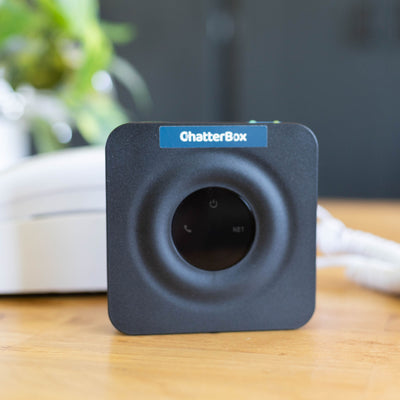
Not for our Wi-Fi phones. Put the phone anywhere you have Wi-Fi and power. You can move it from room to room whenever you like. The OldSchool adapter is the exception: it connects to your router with a network cable.
What happens if my child calls 911?
Emergency calls go through regardless of parental control settings. After an emergency call, a 2-hour callback window opens so emergency services can call back even if they’re not on your approved list. If you have 911 alerts set up, you’ll receive a text message the moment an emergency call is dialed.
Can I manage everything from my phone?
Yes. All administration happens in your ChatterBox account, which is smartphone friendly.
What if I need to call a number that isn’t approved?
You can enable our parent PIN override mode that allows you to dial a PIN to complete an outbound call.
Is there a contract or commitment?
No contracts. Cancel anytime. The phone is a one-time purchase that you keep even if you cancel service.
Can I have more than one phone on the same number?
Yes. Extra extensions are normally $2/month each, and we’re waiving this fee for 2026. When someone calls, both phones ring and whichever is picked up first answers. Even if one phone is in use, the other can still make and receive calls.
Is there a cordless option?
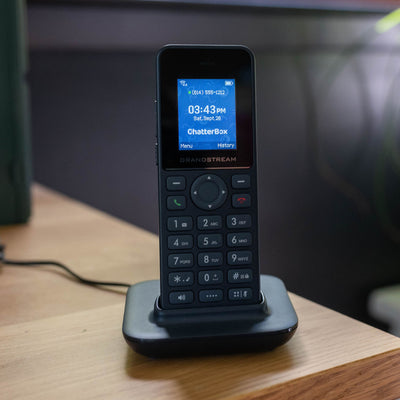
Yes. The WalkieTalk and WalkieTalk+ run on Wi-Fi and go anywhere your Wi-Fi reaches. You can also connect your own cordless phone to the OldSchool adapter.
Do your phones have Caller ID?
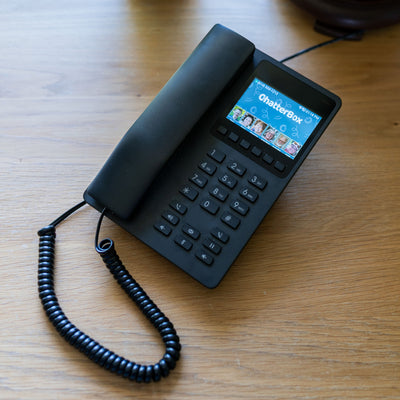
FamilyTalk, WalkieTalk and WalkieTalk+ have Caller ID screens. SmallTalk is fully screen-free. Check each phone’s page for details.
Can I use an old analog phone?
Want your kids to kick it old school on a vintage hamburger phone? Order the OldSchool adapter. It connects to your internet with a network cable and to your analog phone with a phone cord. Same parental controls, same approved contacts.
Do you have voicemail?
Yes, each ChatterBox line gets voicemail.
Can I restrict phone usage during certain hours?
Yes. Set up quiet hours in your ChatterBox account to stop inbound and outbound calls (except 911) during the times you choose.
What about conference calls?
We support three-way calling. See your phone’s documentation for instructions.
Can I disable parental controls completely?
Yep. Turn them off any time in your ChatterBox account.
How do I activate a phone I bought here?
Your phone arrives with an activation card. Create your ChatterBox account, enter the code from the card, pick monthly or annual, and add your 911 address and approved contacts. You can create your account and add contacts before the box arrives.
Can my kids video call?
We’re investigating whether video calling fits our model. It would only work between ChatterBox phones. Interested? Let us know.
Are you the same company as Waffle, or “Chatterbox by Waffle”?
No. ChatterBox Phone is an independent company based in Ohio, and we have been shipping phones to families since before that product existed. Waffle Kids is a separate, unrelated company that briefly launched under the name “Chatterbox by Waffle” before renaming. If you see “Waffle (formerly Chatterbox)” on a comparison site, that is not us.
Setup guides for every phone
Pick your phone. Most families are talking within ten minutes.
Need help? We’re here.
Real people, in Ohio, who own these phones too. Drop us a line and we’ll get dialed in.
We answer email and texts every day and usually reply within a few hours.